Adding an Assignee Group for Third-Party Contacts
After adding accounts and contacts, you can create contact groups that owners can use to quickly assign multiple contacts at once to read or complete content. You can add an assignee group that includes third-party contacts from a single site or a group that includes third-party contacts from multiple sites.
Add an Assignee Group for Third-Party Contacts
- Click Settings & Tools > Third-Party Setup, and then click Group Manager.
- If you have access to multiple sites, select a site containing at least some the third-party contacts you want to assign to the group.
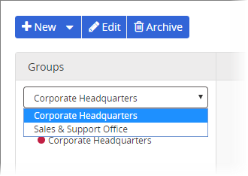
- Click New, and then click New Group or New Multi-Site (Global) Group.
- Type a group name.
- In the group name list, do one of the following:
- To include specific contacts from specific sites and accounts, select Manually Select Users, and then do the following.
- Select an account, and then select the contacts you want included in the group.
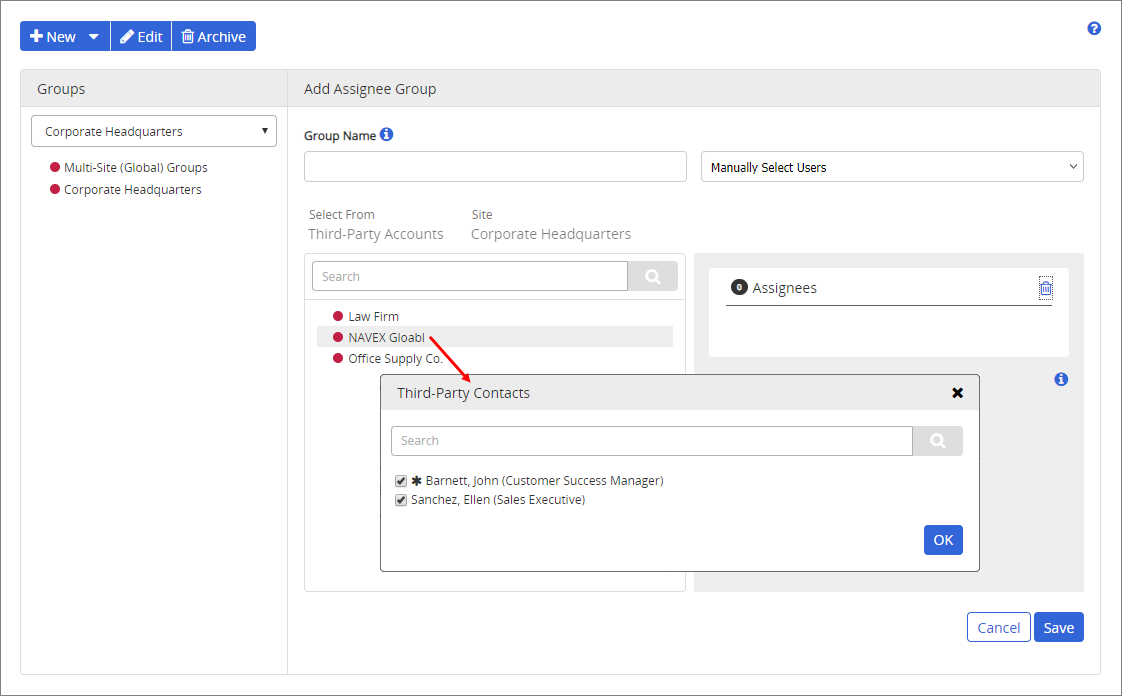
Note: A contact designated as an account's primary contact is marked with
 .
.- To include all contacts from all accounts in the currently selected site, select All Contacts.
- To include only those contacts designated as account representatives for all accounts in the currently selected site, select All Primary Contacts.
- (Multi-site group only) Select a different site, and then select additional contacts.
- Click Save.
 Product Information
Copyright
Product Information
Copyright
This publication was written and produced at NAVEX Global, Inc., Lake Oswego, Oregon. This publication or any portion thereof is confidential and/or proprietary and may not be reproduced or used in any manner whatsoever without the express written permission of NAVEX Global, Inc.
Copyright © 2026 NAVEX Global, Inc. NAVEX Global® is a registered trademark/service mark of NAVEX Global, Inc. The NAVEX Global® logo is a trademark/service mark of NAVEX Global, Inc. Unauthorized use of NAVEX Global, Inc.’s trademarks/service marks is strictly prohibited without prior written permission from NAVEX Global, Inc.