Resending a Welcome Email to a Third-Party Contact
The first time a task, such as reviewing or reading a document, is assigned to a third-party contact, an introductory email is sent to the contact. The email includes your company name as the task requester and login instructions. If a third-party contact cannot find or has deleted the welcome email, you can resend it.
Resend a Welcome Email to a Third-Party Contact
- Click Settings & Tools > Third-Party Setup, and then click Account Manager.
- Click an account to view its contacts, and then click a contact.
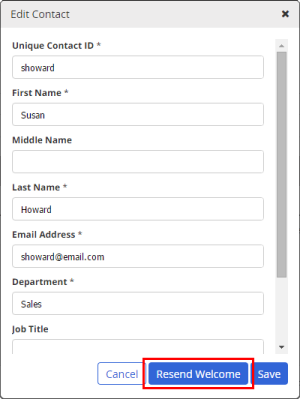
- In the Edit Contact menu, click Resend Welcome.
Note: If you do not see the Resend Welcome button, then this contact has not yet been assigned a Policy & Procedure Management task.
 Product Information
Copyright
Product Information
Copyright
This publication was written and produced at NAVEX Global, Inc., Lake Oswego, Oregon. This publication or any portion thereof is confidential and/or proprietary and may not be reproduced or used in any manner whatsoever without the express written permission of NAVEX Global, Inc.
Copyright © 2025 NAVEX Global, Inc. NAVEX Global® is a registered trademark/service mark of NAVEX Global, Inc. The NAVEX Global® logo is a trademark/service mark of NAVEX Global, Inc. Unauthorized use of NAVEX Global, Inc.’s trademarks/service marks is strictly prohibited without prior written permission from NAVEX Global, Inc.