Accessing Localized Copies from within the Original Document or Assessment
You can use the Localization Workflow step in the original document's or original assessment's Properties Wizard to access localized copies while the localized copies are in any workflow status (Predraft, Draft, Collaboration, Review, Approval, Pending, Published, or Archived). You cannot, however, delete a localized copy from within the original document/assessment after the localized copy has been approved and moved to Pending, Published, or Archived status.
Important: As the original document/assessment owner, you will continue to have access to all localized copies even if the owner of a localized copy selects a security level that would normally exclude you. Also, while you can only assign a localized copy to sites you have access to, a localized copy owner may have access to additional sites and could assign the localized copy to a site you do not have access to. In this case, you will still have access to the document/assessment but only by directly accessing it. You can click the document/assessment link in the Localization Workflow step of the Properties Wizard or enter the document/assessment URL in your browser.
Access Localized Copies from within the Original Document or Assessment
- Open the original document or assessment, click the Properties Wizard tab, and then click Localization Workflow.
Note: In a document/assessment list, an original title is preceded by a down arrow (↓).
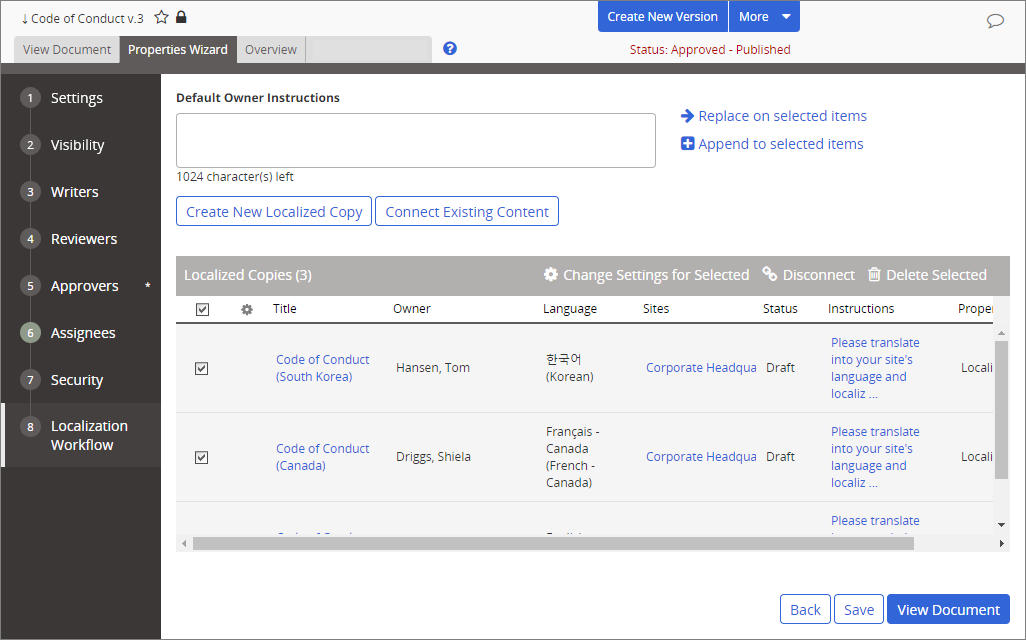
- Make the needed changes, and then click Save.
 Product Information
Copyright
Product Information
Copyright
This publication was written and produced at NAVEX Global, Inc., Lake Oswego, Oregon. This publication or any portion thereof is confidential and/or proprietary and may not be reproduced or used in any manner whatsoever without the express written permission of NAVEX Global, Inc.
Copyright © 2026 NAVEX Global, Inc. NAVEX Global® is a registered trademark/service mark of NAVEX Global, Inc. The NAVEX Global® logo is a trademark/service mark of NAVEX Global, Inc. Unauthorized use of NAVEX Global, Inc.’s trademarks/service marks is strictly prohibited without prior written permission from NAVEX Global, Inc.