Using Case Management Integration as a Case Manager
If the Policy & Procedure Management administrator has assigned you the case manager permission, you can request that any published content item you have access to be updated.
-
Open the published document, assessment, or campaign, and do one of the following:
-
Click Request Update.

-
Click More, and then click Request Update.

-
-
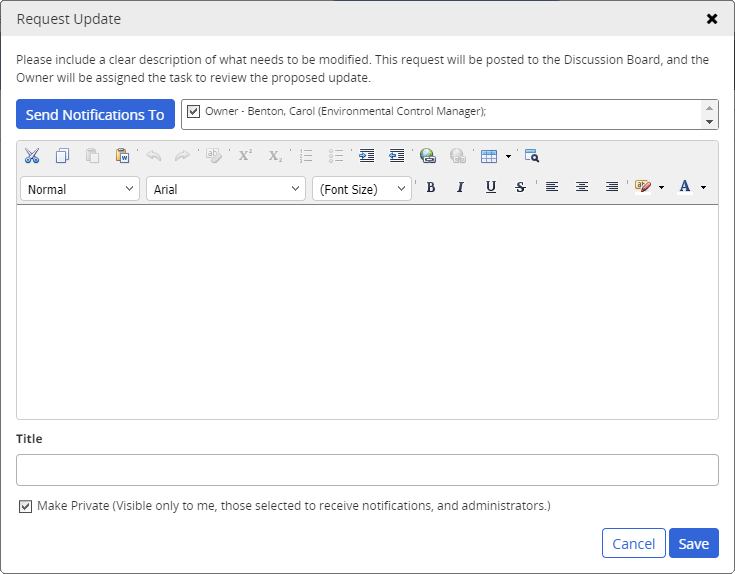
In the Request Update form, type a message. The first 70 characters of the message are copied into the Title box. You can change the title text.
-
(Optional) Notice that the owner's name (and the proxy author's name, if one exists) appears in the recipient list preceded by a check box. The owner is not notified by default. To include the document owner and proxy author, select each individual check box.
-
By default, the new request will be accessible to anyone who can access the content item. To restrict who can see the message to only those you select as recipients, the owner, assigned proxy authors, and administrators, click Make Private.
-
Click Save.
 Product Information
Copyright
Product Information
Copyright
This publication was written and produced at NAVEX Global, Inc., Lake Oswego, Oregon. This publication or any portion thereof is confidential and/or proprietary and may not be reproduced or used in any manner whatsoever without the express written permission of NAVEX Global, Inc.
Copyright © 2026 NAVEX Global, Inc. NAVEX Global® is a registered trademark/service mark of NAVEX Global, Inc. The NAVEX Global® logo is a trademark/service mark of NAVEX Global, Inc. Unauthorized use of NAVEX Global, Inc.’s trademarks/service marks is strictly prohibited without prior written permission from NAVEX Global, Inc.