Printing Items in the Content Grid
You can print a list of the documents, such as all the published documents from the accounting department. Information about all the listed documents is printed, even if the list spans multiple pages.
Print Items in the Content Grid
- Use Search or Browse to display a list of the content items (documents, assessments, or campaigns) you want to include in a printed list.
- (Optional) To include additional columns in the printed document list, click
 , click Show/Hide Columns, and select additional columns, and then click Done. By default, Type, Title, Actions, Ver #, and Status are selected.
 - Click
 , and then click Print List (Standard). The list opens in a separate browser window where you can view, print, and save a file to your local drive in different formats.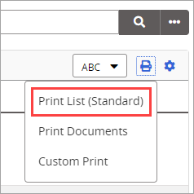
 Product Information
Copyright
Product Information
Copyright
This publication was written and produced at NAVEX Global, Inc., Lake Oswego, Oregon. This publication or any portion thereof is confidential and/or proprietary and may not be reproduced or used in any manner whatsoever without the express written permission of NAVEX Global, Inc.
Copyright © 2026 NAVEX Global, Inc. NAVEX Global® is a registered trademark/service mark of NAVEX Global, Inc. The NAVEX Global® logo is a trademark/service mark of NAVEX Global, Inc. Unauthorized use of NAVEX Global, Inc.’s trademarks/service marks is strictly prohibited without prior written permission from NAVEX Global, Inc.