Using the Public Viewer
The Public Viewer feature in Policy & Procedure Management enables you to assign the Public security level to published documents that you want accessible to anyone who is not a Policy & Procedure Management user. Assessments and campaigns cannot be set to the Public security level and cannot be accessed using the Public Viewer.
Important: The Public Viewer module must be purchased separately and enabled for your organization. Contact your administrator if you have questions about using the Public Viewer module.
Set Public Viewer Security
- While creating or editing a document, click the Properties Wizard tab, and then click Security.
- In the Security Level list, click Public.
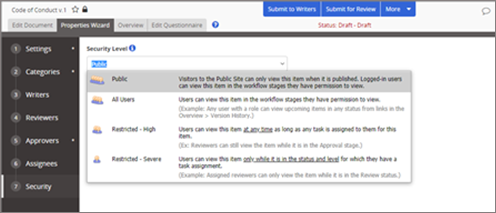
- Finish creating or editing the document, and then save it as you normally would.
 Product Information
Copyright
Product Information
Copyright
This publication was written and produced at NAVEX Global, Inc., Lake Oswego, Oregon. This publication or any portion thereof is confidential and/or proprietary and may not be reproduced or used in any manner whatsoever without the express written permission of NAVEX Global, Inc.
Copyright © 2026 NAVEX Global, Inc. NAVEX Global® is a registered trademark/service mark of NAVEX Global, Inc. The NAVEX Global® logo is a trademark/service mark of NAVEX Global, Inc. Unauthorized use of NAVEX Global, Inc.’s trademarks/service marks is strictly prohibited without prior written permission from NAVEX Global, Inc.