Enabling WordModulePlus (Mac)
Important: The WordModulePlus module for Mac is a Java applet, which means that you must have Java installed on your Mac computer in order to open and edit a document and have PolicyTech™ automatically re-upload the document each time it is saved. For Mac OS X versions 10.6 and earlier, Java is pre-installed on your computer. For Mac OS X 10.7 and later, Java does not come pre-installed. You will need to download the latest version of Java, if you haven't already done so. See the following article on the Java website for instructions: How do I install Java for my Mac?
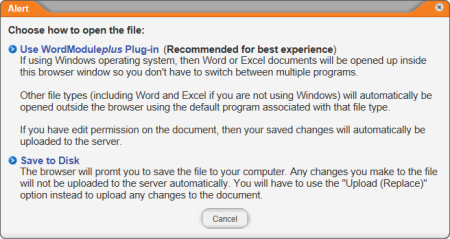
- When you see the window below, click Use WordModulePlus Plug-in.
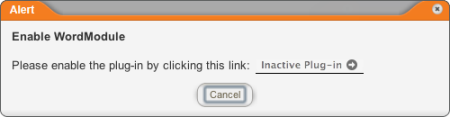
- Click Inactive Plug-In.
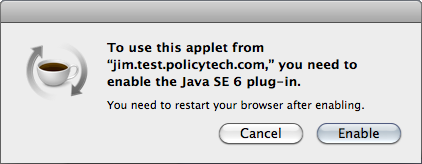
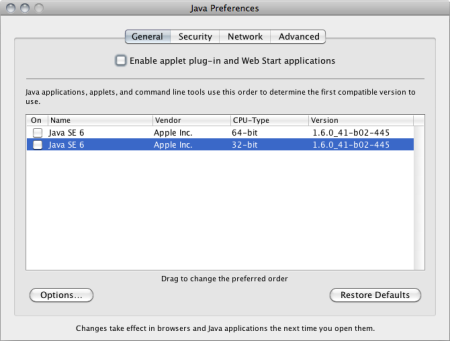
- You will see one of the following windows:
- If you see this window, click Enable.
- If you see the window below, in the lower box, select the check boxes in the On column to enable Java, and then click Enable applet plug-in and Web Start applications. Close Java Preferences.
- For the changes to take effect, you must close and restart your browser. Close the document window, log out of PolicyTech, and then close all other browser windows.
- Restart the browser and log in to PolicyTech.
- Find and open the document you were working on (see Finding a Document in a Specific Status for help finding the new document in the draft stage).
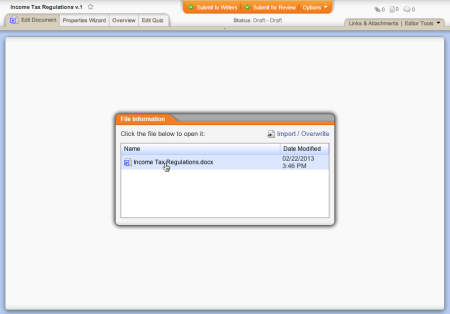
- In the File Information window, click the document file name.
- Click Use WordModulePlus Plug-in again.
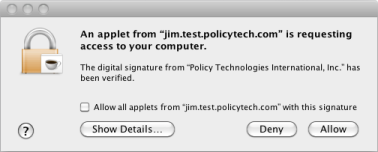
- When asked if you want to give the PolicyTech applet access to your computer, click Allow.
Note: Clicking Allow will let the applet run for the duration of the current browser session. If you don't want to have to click Allow in each new browser session, select the Allow all applets from "[PolicyTech server name]" with this signature check box.
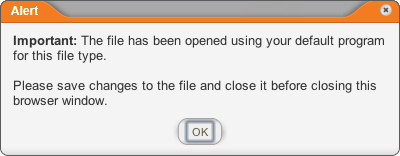
- The document opens in its default program, and the following window is displayed in PolicyTech. Click OK to close the alert.
Note: The Mac OS controls which program opens a file of a certain type.
- While working on the document outside of PolicyTech, be sure to save it periodically. PolicyTech detects each time the document is saved re-uploads a copy of the file.
- When you are finished working on the document contents, save the document, and then close the program.
- Back in PolicyTech, continue with step 11 in the "High-Level Steps for Creating a Document (Mac)" section.
 Screenshot...