Working with the Overview
The Overview tab for a content item contains detailed information, such as properties, version history, assigned task status, links, security, and discussions that are displayed on separate pages. By default, the Overview tab displays the Properties page.
Note: The Overview tab in a content item will not appear if your Policy & Procedure Management system is configured to hide the tab for users with only the Assignee role.
Work with the Overview
To gain access to the overview information for a content item, do any of the following:
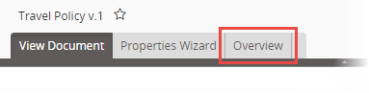
- Open a content item, and then click the Overview tab.
- In the content grid, for the item you wish to view, in the Actions column, click
 , and then click View Properties.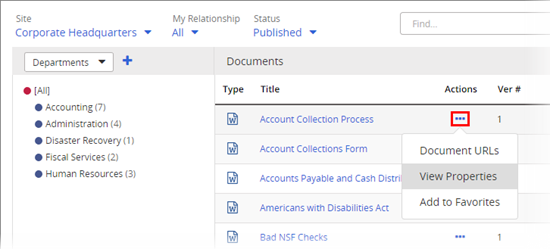
- In the content grid, for the item you wish to view, in the Status column, click the link.
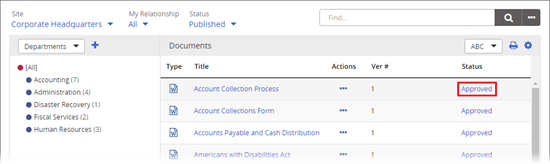
Note: If you click the link in the Status column of the grid, you may be taken to the corresponding status page instead of the Properties page.
Refer to the following topics for information about the available pages of the Overview:
 Product Information
Copyright
Product Information
Copyright
This publication was written and produced at NAVEX Global, Inc., Lake Oswego, Oregon. This publication or any portion thereof is confidential and/or proprietary and may not be reproduced or used in any manner whatsoever without the express written permission of NAVEX Global, Inc.
Copyright © 2026 NAVEX Global, Inc. NAVEX Global® is a registered trademark/service mark of NAVEX Global, Inc. The NAVEX Global® logo is a trademark/service mark of NAVEX Global, Inc. Unauthorized use of NAVEX Global, Inc.’s trademarks/service marks is strictly prohibited without prior written permission from NAVEX Global, Inc.